Tell customers about an outage
Publish the incident on your status page and let subscribers get the email instead of writing to each one.
Business Status Page Builder
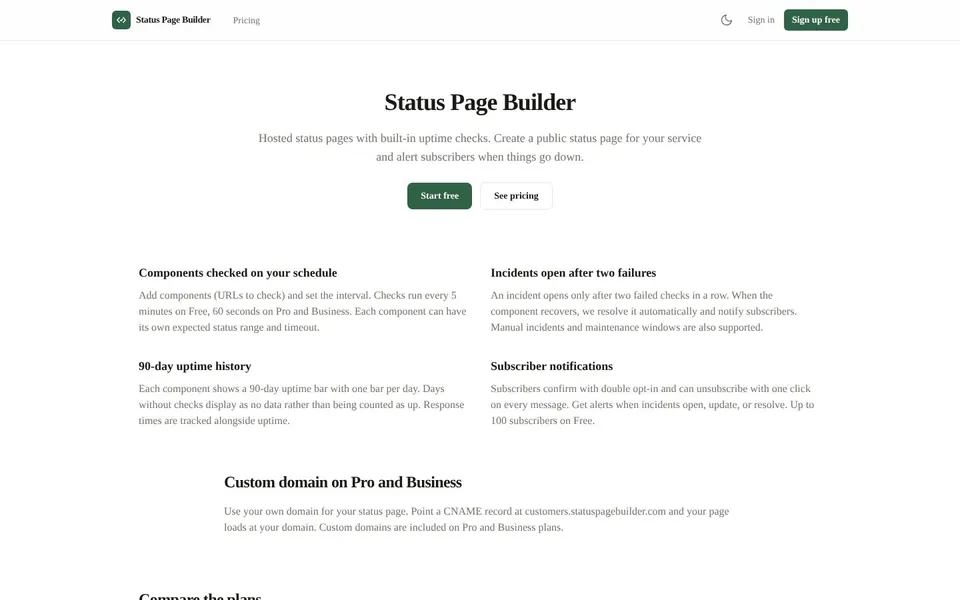
A website monitoring tool checks your site on a schedule and tells you when it stops answering. Status Page Builder at statuspagebuilder.com does that and publishes the result as a public status page. Subscribers get an email when an incident opens, updates or resolves.

A status page app is a hosted page that shows whether your service is up, and Status Page Builder adds uptime checks to it. You add components, which are URLs to check, and the page shows each one with its current state.
Each component can have its own expected status range and timeout. The page is public, and the Business plan adds password-protected pages.
Status Page Builder is a Quolapps product, and the checks, the incident handling and the subscriber emails all live in one hosted service. You do not need a separate monitoring service to feed the page.
A website monitoring tool helps when customers need an answer faster than a support reply.
Tell customers about an outage
Publish the incident on your status page and let subscribers get the email instead of writing to each one.
Watch several services at once
Add a component for each URL you depend on and see them together with one uptime bar each.
Announce planned maintenance
Create a manual incident or a maintenance window so subscribers know before it happens.
Use your own domain
On Pro and Business, point a CNAME record at customers.statuspagebuilder.com and the page loads at your domain.
Uptime monitoring with Status Page Builder starts on the free plan with no credit card: create a status page, add the components you want checked, and each one is checked on a schedule.
Open Status Page BuilderOpen statuspagebuilder.com and click Start free.
Create your account and open the dashboard.
Create your status page.
Add components by entering the URL you want to check, and set the interval.
Optionally set the expected status range and timeout for each component.
Share the page address, and let subscribers sign up with the double opt-in email.
Watch incidents open and resolve automatically, or add a manual incident with updates.
The website uptime monitor has fixed limits per plan, and these figures come from the plan configuration the server enforces.
Days without checks show as no data rather than being counted as up. Response times are tracked alongside uptime.
Checks are not counted against your plan. The limits are the number of components, the fastest interval and feature access. If you downgrade and exceed the new limits, extra components are paused, not deleted.
The free uptime monitor in Status Page Builder includes one status page with 3 components checked every 5 minutes. It also allows up to 100 subscribers, and no credit card is required.
An incident opens only after two failed checks in a row. That avoids opening an incident for a single failed check.
As an uptime robot alternative, Status Page Builder combines uptime checks with a hosted status page that alerts your subscribers when something goes down. It checks the URLs you add, opens an incident after two failed checks in a row, resolves it automatically on recovery and emails your subscribers.
It also publishes a status page with a 90-day uptime bar per component. Subscribers confirm with double opt-in and can unsubscribe with one click on every message.
Status page examples usually show components, current state and recent incidents, and a Status Page Builder page shows the same kinds of things. Each component has a 90-day uptime bar with one bar per day.
Incidents carry updates from the moment they open to the moment they resolve. Pro and Business pages can use a custom domain and drop the Powered by footer. Manual incidents and maintenance windows are also supported, so planned work can be announced the same way as an outage.
The free status page costs $0 with no credit card, and paid plans are Pro at $12 a month and Business at $39 a month, as of November 2026.
$0
1 status page, 3 components, checks every 5 minutes and 100 subscribers.
$12 / month
1 status page, 20 components, checks every minute, 2,000 subscribers, custom domain, no Powered by footer and REST API access.
$39 / month
5 status pages, 100 components, checks every minute, 10,000 subscribers, custom domain, password-protected pages, no Powered by footer and REST API access.
Billing runs through Stripe with no annual commitment, and you can cancel any time. Prices are from the live Status Page Builder pricing page.
Short answers first, then the detail. More guides: monitor website changes, how to shorten a link, or browse all free online tools.
A status page is a public page that shows whether a service is working and lists incidents.
With Status Page Builder, the page is fed by uptime checks and subscribers can get email alerts.
Status Page Builder does not list a status page template on its pages, so a template is not something to count on.
You create a page, add components and the page shows their state and 90-day history.
To make a status page, sign up on the Free plan, create the page and add your components.
Set the check interval for each one, and the page starts showing results. Subscribers can then sign up through the double opt-in email, and you manage the list from the dashboard.
To monitor website uptime, add the site's URL as a component in Status Page Builder and choose the interval.
The tool checks it on that schedule and tracks response times alongside the uptime bar.
Create a status page on the free plan and add your first component. No credit card is required.
Start a free website monitoring tool with Status Page Builder
Related guides
These guides cover jobs that often come next. See every tool on the free online tools page.