Watch a price or stock line
Use a selector to read one element, such as a price, a stock line or a single table, and get an email when it changes.
Business Page Change Detector
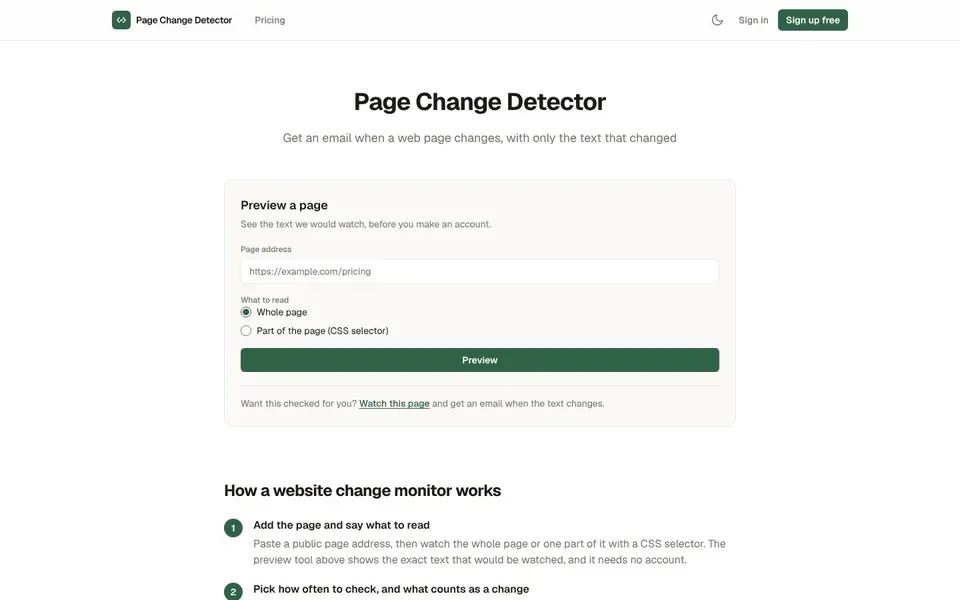
To monitor website changes, you give a tool a public page address and let it compare the text on a schedule. Page Change Detector at pagechangedetector.com does that and emails you only the lines that were added or removed. You can try the preview without an account.

A web page change monitor is a service that reads a page again and again and tells you when its text is different. Page Change Detector is one, and its alert is the diff itself, so you see what changed instead of a vague notice.
You paste a public page address and choose whether to watch the whole page or one part of it with a CSS selector. The tool reads the text, keeps a version history, and emails you when the readable text moves.
A website change tracker is useful whenever a page matters to you but you cannot afford to keep reloading it.
Watch a price or stock line
Use a selector to read one element, such as a price, a stock line or a single table, and get an email when it changes.
Catch a policy or terms update
Watch the whole page and see the exact lines that were added or removed when the wording moves.
Wait for a phrase to appear
Set a monitor to alert only when a phrase appears, such as a date or an open status.
Know when a phrase disappears
Alert only when a phrase disappears, for example a sold out notice or a banner you were waiting to see go.
You can track changes on a website in a few minutes, and the first step needs no account.
Open Page Change DetectorOpen pagechangedetector.com and go to the Preview a page box.
Paste the public Page address and choose Whole page or Part of the page (CSS selector) under What to read.
Click Preview to see the exact text that would be watched, and adjust the selector if needed.
Create a free account and add the page as a monitor.
Pick how often to check from the interval menu, up to the fastest interval your plan allows.
Choose what counts as a change: any change, a phrase appearing, or a phrase disappearing.
Wait for the email. It carries the summary and the changed lines, with added lines marked + and removed lines marked -.
Website change detection here is text only and works on public pages, so it helps to know the limits before you sign up.
Page Change Detector does not read pages behind a login, click or scroll, take screenshots, or send SMS or Slack alerts. A moved image or a layout change is not reported, because the comparison is text.
The basic check reads the HTML the server sends. A page that builds its content in the browser can come back with almost no text, and the monitor says so. Browser rendering is available on Pro and Business for those pages.
A website change alert is only worth reading if it fires on real changes, so the text is cleaned before two versions are compared. Clock times, dates, relative times such as 3 minutes ago, session ids and the usual cookie banner lines are removed.
An alert goes out only when the cleaned text actually changes. A page that cannot be reached is not treated as a change, and a page that answers with a bot wall is reported as blocked. If a selector stops matching, the last good text stays as the baseline.
To monitor website changes politely, Page Change Detector watches one public page, once per interval, per monitor. It obeys a robots.txt group that names PageChangeDetectorBot, never sends cookies and never logs in.
Every alert has a one-click pause link and a stop-alerts link, so you can quiet one monitor or all alerts without signing in.
The free website change monitor needs no card, and prices are as of November 2026. One flat monthly price applies, and checks are never counted.
$0
3 monitors, checked every 60 minutes at the fastest, with 30 days of change history.
$9 a month
25 monitors, every 15 minutes at the fastest, 180 days of history, browser rendering on up to 5 monitors and REST API access.
$19 a month
100 monitors, every 10 minutes at the fastest, 365 days of history, browser rendering on up to 20 monitors and REST API access.
There is no trial period on the paid plans because the free plan is the trial, paid plans are billed monthly, and you can cancel any time. Prices are from the live Page Change Detector pricing page.
Short answers first, then the detail. More guides: website monitoring tool, meta tags for SEO, or browse all free online tools.
Paste a public page address into Page Change Detector, choose the whole page or a CSS selector, and pick a check interval.
The tool compares the cleaned text each time and emails you when it moves. The preview tool on the home page shows what would be watched before you make an account.
You get an email from Page Change Detector when the readable text of the page changes.
The email goes to the verified address on your account. Alerts are email only, with no SMS or Slack.
Yes, you can get notified when website changes involve a phrase, because each monitor can alert on a phrase appearing or disappearing.
Any change is the default trigger. You can switch a monitor to a phrase trigger when you edit it.
To check if a website has changed, add the page as a monitor and read the diff in the email or the dashboard.
The dashboard keeps the same diff side by side with the full history for your plan's window.
Try the free preview to see the text that would be watched, then add your first monitor. The free plan needs no card.
Related guides
These guides cover jobs that often come next. See every tool on the free online tools page.