Launching a new product
Search the category and see which sites already rank with Amazon links in it. Those are warm places to start.
SEO Amazon Affiliate Finder
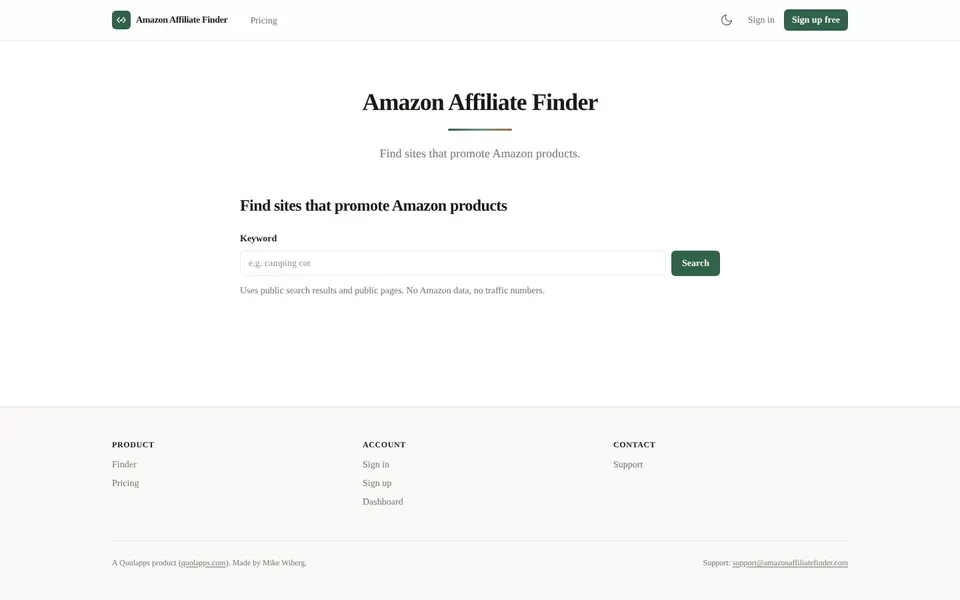
Amazon affiliate sites are websites that publish content with Amazon product links, and a seller can find them by searching one product category. Amazon Affiliate Finder at amazonaffiliatefinder.com does that search for you. It returns the sites that already promote Amazon products in your category, from public search results and public pages.
Amazon affiliate sites are sites whose pages carry Amazon product links, such as review pages and buying guides. For a seller, they are the people already writing about products near yours.
Amazon Affiliate Finder turns that into a list. You enter a keyword, which is one product category such as camping cot, and it sends the search to a public web search engine. Each row names the site, the page that ranks, the query that found it and how many Amazon links that page carried.
The tool only reports what a site publishes in public. It does not contact anyone, send mail or build a shared database of results. What you do with a contact is your own outreach.
Look for Amazon affiliate websites when you want people who already write about your kind of product to hear about yours.
Launching a new product
Search the category and see which sites already rank with Amazon links in it. Those are warm places to start.
Building an outreach list
On a paid plan each row also shows the public contact page the site publishes, ready for individual outreach.
Checking a category
The ranking pages show who covers a niche, which helps you judge how crowded it is.
Replacing a tired list
Run the same category again later. Results are a view of public pages on the day of the search.
To find Amazon affiliate sites, type a product category into Amazon Affiliate Finder and run the search. It takes one box and one button, and the free search needs no account.
Open Amazon Affiliate FinderOpen amazonaffiliatefinder.com.
Type a product category into the Keyword field, for example camping cot.
Click Search.
Read the rows: each site, the page that ranks, and the Amazon links seen on that page.
On Pro or Agency, open the public contact page shown on each row and read the address the site publishes there.
On Pro or Agency, export the results as CSV to sort and filter them.
Amazon affiliate websites in the results come only from public search results and public pages, so the finder shows less than you may expect.
A search counts only when it finishes with at least one site. An empty, failed or refused search is not counted. A site can also ask to be removed from results.
Because the plan check runs before the search is sent, a refused request never uses up your allowance. Free results from a search with no account are kept for 24 hours, so export or note what you need before then.
For Amazon affiliate website examples, the best source is a live search in your own category. A static list goes stale, and the finder shows the ranking pages for your keyword on the day you search.
Each row links to the page that ranks, so you can read how that site presents products before you decide whether to contact it.
This tool does not publish an Amazon affiliate commission list. It reports no Amazon data, so commission rates, earnings and sales figures are outside what it shows.
If you need commission rates, read them in Amazon's own Associates program pages. The finder only tells you who is writing about your product category.
Searching by category is how you cover Amazon affiliate products without guessing. One search is one category, so a seller with several product lines runs one search per line.
The same search lists Amazon affiliate websites in that category. Free shows the top 10 and a paid plan shows the top 50.
Use a specific category rather than a broad one. A phrase like camping cot describes a product, so the sites that come back are likely to be writing about something close to yours.
Amazon Affiliate Finder pricing is a free search every day, then Pro at $29 a month and Agency at $79 a month, as of November 2026. Every plan is metered in searches.
$0
1 search a day per IP address, no signup, the top 10 sites for each search, no public contacts and no CSV export.
$29 / month
50 searches a month, the top 50 sites for each search, the public contact page each site publishes and CSV export.
$79 / month
250 searches a month, the top 50 sites for each search, public contacts, CSV export and REST API access metered in the same searches.
Paid plans are billed monthly, you can cancel any time and there are no credits to buy. Prices are from the live Amazon Affiliate Finder pricing page.
Short answers first, then the detail. More guides: Amazon affiliate link, free email finder, or browse all free online tools.
To find affiliate marketers, search the product category you sell in and list the sites whose ranking pages already carry Amazon product links.
Amazon Affiliate Finder does this with one keyword. It only covers sites that promote Amazon products.
To find Amazon affiliates, look for sites that publish Amazon product links in your category and read what they write.
The finder lists them by category and, on a paid plan, shows the contact page each site publishes.
To find affiliates for my product, as a seller would ask, start with the category your product belongs to and search it.
Pick the sites that fit, read their ranking pages, then write to each one individually. The terms ask for individual, relevant outreach only, with no bulk unsolicited email.
Enter one product category and see which sites already promote Amazon products in it. The free search needs no account.
Find Amazon affiliate sites free with Amazon Affiliate Finder
Related guides
These guides cover jobs that often come next. See every tool on the free online tools page.